01. Overview & Architecture

Profile: 2026.05.11
Schema validatedSource pinned
Purpose
Usability-first, fluid and hyper-customized Wayland desktop configuration with Quickshell.
Compatibility
Arch Linux, Fedora, NixOS (Server: WAYLAND)
Window Manager & Theme
Hyprland / Dynamic Material Colors
Key Components
Bar:Quickshell Bar & Quick Settings•Terminal:Foot / Kitty•Launcher:Quickshell App Grid•Notifications:Quickshell Popups•Editor:Neovim•Shell:fish + Starship
Full Description
An advanced, highly interactive Linux desktop environment combining Hyprland and Quickshell. Features bespoke Material Design 3 inspired widgets, integrated quick settings, media controls, animated workspace switchers, and deep keyboard navigation workflows.

02. Installation & Deployment

Before you installThis changes your desktop configuration. Run it as your normal user, never with sudo: it asks for sudo only where a step needs it (listed below).The guided installer shows its plan first. Files it would replace are kept unless you approve. Everything it copies, clones or appends to in your home folder is backed up and verified first, and --rollback restores it. Packages, sudo changes and the other commands listed under Impact are not undone.
IntegrityEach release from main builds the installers in GitHub Actions and signs them with a GitHub build attestation. Verify your download against the repository, not this website (Option B, step 2). If it does not verify, don't run it.
ImpactWrites: ~/.config/hypr/dotsRuns the upstream installer ./setup.sh, which manages its own files. The guided installer backs up your usual desktop config folders first.
RecoveryGuided: backups in ~/.local/state/0xtsoa/backups/, undo with bash install.sh --rollback.Manual: back up first (Option A, step 3).
Option A: manual installAdvanced
Read the source at the reviewed commit, back up, then run each step yourself.
$git clone https://github.com/end-4/dots-hyprland ~/0xtsoa-review/end-4-dots-hyprland# 1. clone to a review folder
$git -C ~/0xtsoa-review/end-4-dots-hyprland checkout --detach 2f2a376fdb2ad738bf55f693dd0b474b64bb0ab8# 2. the reviewed commit
$for p in ~/.config/hypr/dots ~/.config/hypr ~/.config/quickshell ~/.config/waybar ~/.config/eww ~/.config/ags ~/.config/hyprpanel ~/.config/kitty ~/.config/foot ~/.config/alacritty ~/.config/wezterm ~/.config/ghostty ~/.config/rofi ~/.config/wofi ~/.config/fuzzel ~/.config/dunst ~/.config/mako ~/.config/swaync ~/.config/i3 ~/.config/sway ~/.config/niri ~/.config/bspwm ~/.config/sxhkd ~/.config/awesome ~/.config/polybar ~/.config/picom ~/.config/qtile ~/.config/wlogout ~/.config/swaylock ~/.config/fish ~/.config/nvim ~/.config/fastfetch ~/.config/starship.toml ~/.config/matugen ~/.config/wal ~/.config/gtk-3.0 ~/.config/gtk-4.0 ~/.config/Kvantum ~/.config/qt5ct ~/.config/qt6ct ~/.bashrc ~/.zshrc ~/.themes; do [ -e "$p" ] && cp -a "$p" "$p.bak-0xtsoa"; done# 3. back up what the steps write
Read the upstream installer in ~/0xtsoa-review/end-4-dots-hyprland before running it, and every script it calls.Then the steps. Package commands are written for Arch; on other distros use your package manager.

Step-by-step deployment protocol

Step-by-step deployment
1Clone repository dotfiles
$git clone --filter=blob:none https://github.com/end-4/dots-hyprland.git ~/.config/hypr/dots
$git -C ~/.config/hypr/dots checkout 2f2a376fdb2ad738bf55f693dd0b474b64bb0ab8
2Deploy Quickshell & Hyprland configs
$cd ~/.config/hypr/dots
$./setup.sh
3Reload compositor
$hyprctl reload
Option B: guided installerRecommended
The same steps as one script for any distro. It shows the plan first, keeps files you already have unless you approve replacing them, and backs up everything it changes in your home folder. Never pipe it into a shell.
$curl -fsSLo install.sh 'https://www.0xtsoa.dev/configs/end-4/dots-hyprland/install.sh'# 1. download
$gh attestation verify install.sh --repo nyharena25/0xTsoa --signer-workflow nyharena25/0xTsoa/.github/workflows/attest-installers.yml# 2. verify (GitHub CLI 2.49+, signed in)
$less install.sh# 3. read it
$bash install.sh --dry-run# 4. preview: changes nothing
$bash install.sh# 5. install (asks first)
$bash install.sh --rollback# undo the file changes
View script in browserOther options: --force (replace conflicts, backed up first), --yes, --help

03. Screenshot Gallery // Illogical Impulse Dots

Capture 01 // Fullscreen
AI & Settings App on Illogical Impulse Hyprland
01 / 14

04. Documentation & Guide

Source: end-4/dots-hyprlandRef: 2f2a376fdb
.github/README.md|GitHub Flavored Markdown

【 end_4's Hyprland dotfiles 】


• overview •

Warning

Hyprland 0.55 update: If your distro has not shipped Hyprland 0.55 and/or you're not ready for it, you should switch to the Pre-Hyprland Luaification release (or not update yet, if you're going to do that). See the wiki for more info: Install | Update

What this is/isn't
  • Technically, configuration files
  • Realistically, mostly the custom graphical shell
  • NOT a system setup script: no graphic drivers, no zram setup, etc.
Notable features
  • Overview: Shows open apps with live previews
  • AI: Gemini, Ollama, and more
  • QoL: screen translation, anti-flashbang, Google Lens
  • Material themes: Choose your wallpaper, done, enjoy
  • Transparent installation: Every command is shown before it's run
Installation
  • IMPORTANT: Hyprland 0.55 Update: If your distro has not shipped Hyprland 0.55 and/or you're not ready for it, you should switch to the Pre-Hyprland Luaification release. See the wiki for more info
  • Just run bash <(curl -s https://ii.clsty.link/get)
    • Or, clone this repo and run ./setup install
    • See the wiki for more details
  • Keybinds: Should be somewhat familiar to Windows or GNOME users. Important ones:
    • Super+/ = keybind list
    • Super+Enter = terminal
Software overview
Software Purpose
Hyprland The compositor (manages and renders windows)
Quickshell A QtQuick-based widget system, used for the status bar, sidebars, etc.
Others See deps-info.md
Discord Server link | I hope this provides a friendlier environment for support without needing me to personally accept every friend request/DM. For real issues, prefer GitHub

• screenshots •

illogical-impulse logo

Widget system: Quickshell | Support: Yes

Showcase video

AI, settings app Some widgets
image image
Window management wow look its orange
image image

• thank you •

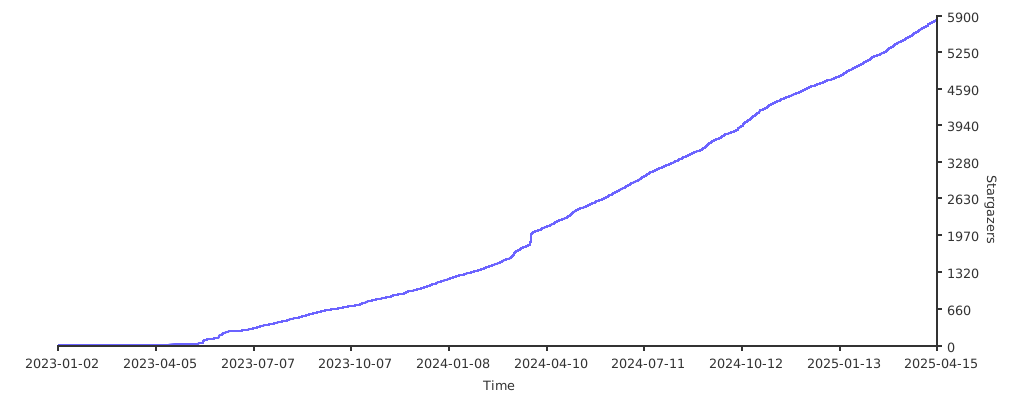
• stonks •

![Stargazers over time](https://starchart.cc/end-4/dots-hyprland.svg?variant=adaptive)


• previous styles •

  • Unsupported!
  • Source: illogical-impulse AGS in ii-ags branch, others in archive branch.
  • List is in reverse chronological order

illogical-impulse (AGS)

Widget system: AGS | Support: No

AI Common widgets
image image
Window management Weeb power
image image
m3ww

Widget system: EWW | Support: No

Material Eww!
NovelKnock

Widget system: EWW | Support: No

Desktop Preview
Hybrid

Widget system: EWW | Support: No

click the circles!
Windoes

Widget system: EWW | Support: No

Desktop Preview

• inspirations/copying •

  • Inspiration: osu!lazer (Hybrid), Windows 11 (Windoes), AvdanOS (NovelKnock), Material Design 3 (m3ww & later)
  • Copying: Absolutely, feel free. Just follow the license and it's all good
GitHub Flavored Markdown (github-markdown-css)README snapshot at 2f2a376fdb

05. Keyboard Shortcuts

Total: 4 shortcuts
SUPER + RETURNShortcut
exec, foot
Spawn terminal window
SUPER + DShortcut
exec, quickshell -p appgrid
Toggle app drawer
SUPER + WShortcut
killactive
Close focused client
SUPER + TABShortcut
exec, quickshell -p overview
Interactive window overview