What is this?
La Capitaine is an icon pack — designed to integrate with most desktop environments. The set of icons takes inspiration from the latest iterations of macOS and Google's Material Design through the use of visually pleasing gradients, shadowing, and simple icon geometry.
Every image in this theme is a scalable vector graphic so it will look great at any size, on any screen. In my spare time, I work on adding new icons, updating old ones, and making this theme more complete. Since this theme is updated often, you should clone this git repository and pull regularly to make sure you're always up-to-date:
cd ~/.icons
git clone https://github.com/keeferrourke/la-capitaine-icon-theme.git
Alternatively, there are AUR PKGBUILDs available, so if you're on Arch Linux, simply run:
yay -S la-capitaine-icon-theme       # point releases
yay -S la-capitaine-icon-theme-git   # git master branch
Fedora and EPEL users can also install from the official repositories
sudo dnf install la-capitaine-icon-theme
Configuration
La Capitaine comes with a configuration script which attempts to determine your distribution and desktop environment. Using this information, La Capitaine updates several system icons and icons used for mime-types.
For best integration with your distro/desktop environment, please run
./configure and follow the prompts.
Use a dark GTK+ theme?
La Capitaine doesn't ship with two distinct variants, because I wanted to keep the size of this project to a minimum.
You'll need to run the configuration script to tell La Capitaine to update its directory structure to use the dark variant.
Troubleshooting
If something does not work as expected with La Capitaine, take a look at `SUPPORT`. There you'll find the most common traps, their solutions and known issues. Please read this doc before submitting an issue.
License
La Capitaine is fully free software that is dual-licensed under the MIT and GPLv3 licenses.
Much of the artwork in La Capitaine is based on Numix Circle and El General GNOME (now known as Antu), with significant additions and changes. This art is to be treated as a GPLv3 licensed library.
The included configuration script is licensed under the permissive MIT license.
See the LICENSE and COPYING files for more details.
Donations
If you like this icon pack and want to support me, please consider donating via Paypal or Pling :smile:
If you want to contribute to this project but can't make a monetary donation, shoot me an email and we can sort something out.
Be sure to check out Thanks.md to see a list of significant donors and
contributors!
Icon Requests and Issues
If there's an icon that's missing in this project, feel free to contact me or open an issue.
To make my life easier and to ensure that your requests are fullfilled faster, I expect a particular format for any new issues. Please read the wiki before opening an issue.
Community contributions are always welcome. Feel free to fork this project and submit bug fixes, or to contribute new icons or icon revisions. See submitting pull requests on the wiki.
Roadmap
To-do:
- Add alternative file-browser icons (requested a few times)
- Add hardcode tray support
Preview
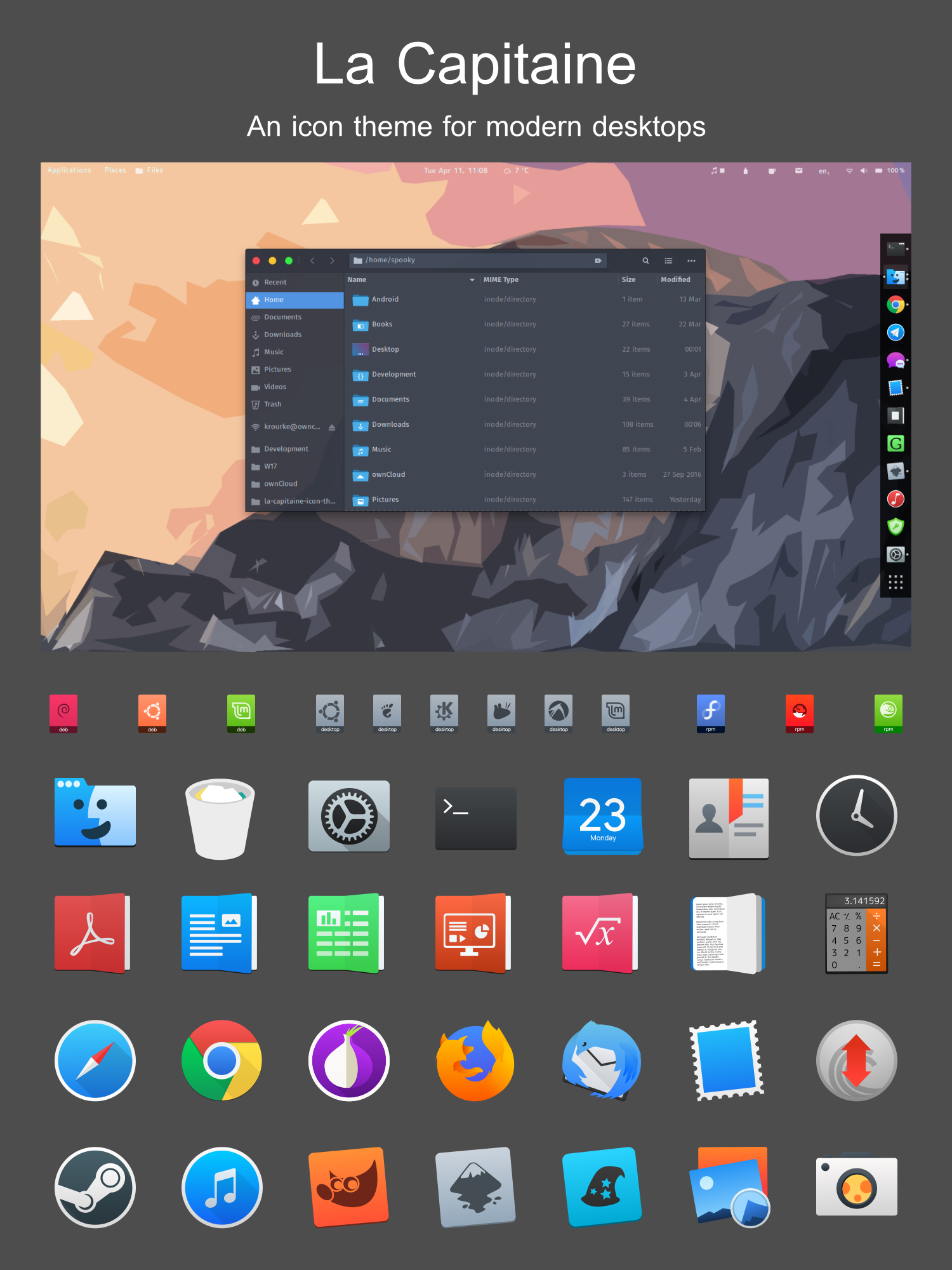
The GTK theme in this preview is X-Arc;