01. Overview & Architecture

Schema validatedSource pinned
Purpose
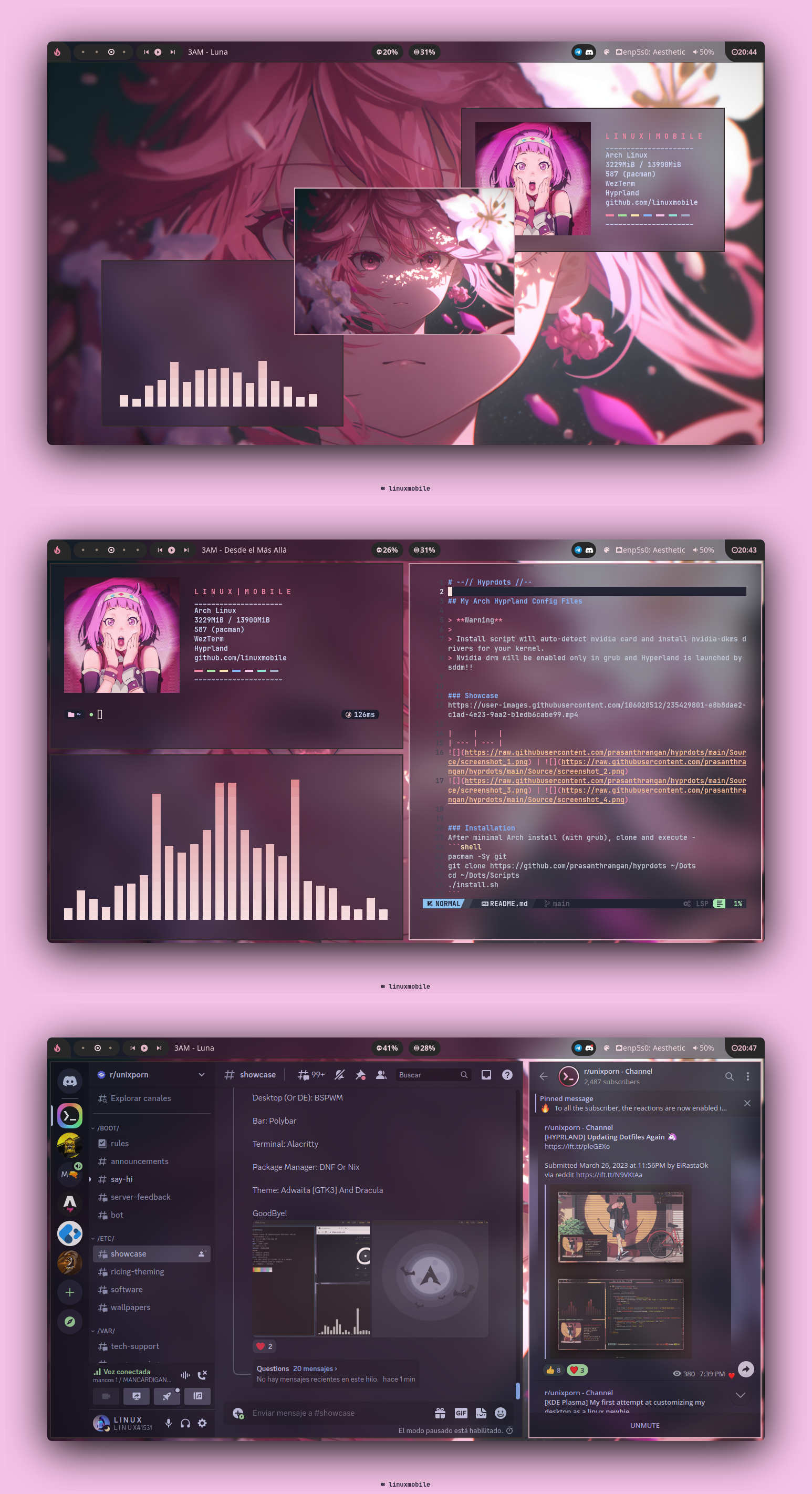
Compact Hyprland rice with eww widgets and a warm, low-contrast palette.
Compatibility
Any distro (Server: WAYLAND)
Window Manager & Theme
Hyprland / Other

02. Installation & Deployment

Before you installThis changes your desktop configuration. Run it as your normal user, never with sudo: it asks for sudo only where a step needs it (listed below).The guided installer shows its plan first. Files it would replace are kept unless you approve. Everything it copies, clones or appends to in your home folder is backed up and verified first, and --rollback restores it. Packages, sudo changes and the other commands listed under Impact are not undone.
IntegrityEach release from main builds the installers in GitHub Actions and signs them with a GitHub build attestation. Verify your download against the repository, not this website (Option B, step 2). If it does not verify, don't run it.
ImpactRuns the commands listed in the steps below.
RecoveryGuided: backups in ~/.local/state/0xtsoa/backups/, undo with bash install.sh --rollback.Manual: the steps below only write in the download folder or run listed commands.
Option A: manual installAdvanced
Read the source at the reviewed commit, back up, then run each step yourself.
$git clone https://github.com/linuxmobile/hyprland-dots ~/0xtsoa-review/linuxmobile-hyprland-dots# 1. clone to a review folder
$git -C ~/0xtsoa-review/linuxmobile-hyprland-dots checkout --detach ccf0161276fac2e87301d399609dcad377038c4e# 2. the reviewed commit
Then the steps. Package commands are written for Arch; on other distros use your package manager.

Step-by-step deployment protocol

Step-by-step deployment
1Clone the repository
$git clone --filter=blob:none https://github.com/linuxmobile/hyprland-dots
$git -C hyprland-dots checkout ccf0161276fac2e87301d399609dcad377038c4e
$cd hyprland-dots
2Follow the upstream README
$xdg-open https://github.com/linuxmobile/hyprland-dots#readme
Option B: guided installerRecommended
The same steps as one script for any distro. It shows the plan first, keeps files you already have unless you approve replacing them, and backs up everything it changes in your home folder. Never pipe it into a shell.
$curl -fsSLo install.sh 'https://www.0xtsoa.dev/configs/linuxmobile/hyprland-dots/install.sh'# 1. download
$gh attestation verify install.sh --repo nyharena25/0xTsoa --signer-workflow nyharena25/0xTsoa/.github/workflows/attest-installers.yml# 2. verify (GitHub CLI 2.49+, signed in)
$less install.sh# 3. read it
$bash install.sh --dry-run# 4. preview: changes nothing
$bash install.sh# 5. install (asks first)
$bash install.sh --rollback# undo the file changes
View script in browserOther options: --force (replace conflicts, backed up first), --yes, --help

03. Screenshot Gallery // linuxmobile Hyprland Dots

Capture 01 // Fullscreen
linuxmobile Hyprland Dots screenshot 1
01 / 02

04. Documentation & Guide

Source: linuxmobile/hyprland-dotsRef: ccf0161276
README.md|GitHub Flavored Markdown
  • Window Manager • Hyprland🎨 Tiles Everywhere!
  • Shell • Zsh 🐚 con starship Cross Shell Platform!
  • Terminal • WezTerm 💻 A powerful term with gpu support!
  • Panel • Waybar🍧 Patched waybar following hyprland faq!
  • Notify Daemon • Dunst 🍃 Minimalist and functional!
  • Launcher • Rofi 🚀 Realmente rápido y customizable!
  • File Manager • Ranger🔖 custom!
  • GUI Basic-IDE • NvChad-V2 Rice IDE!

🌸 Setup
OLD SETUP

GRUVxYRLAND

Install steps (Take care about it. Isn't a tutorial)

Read Spanish Detailed Guide Here

LONG READ DISCLAIMER

INSTALLATION (Arch Based Only)

First of all, this is a cute disclaimer. All of this settings are installed in Artix and in wayland only! I don't know how it work in other distro.

Hyprland Stuff

To get started, let's make sure we have all the necessary prerequisites. In this case, I'm using Paru as the AUR helper, but keep in mind that your system may require a different approach.
  • Installation using paru
## Hyprland Stuff
paru -S hyprland-git hyprpicker-git waybar-git \
dunst nwg-look wf-recorder wlogout wlsunset

Dependencies

  • Installation using paru
## Dependencies
paru -S colord ffmpegthumbnailer gnome-keyring grimblast-git gtk-engine-murrine \
imagemagick kvantum pamixer playerctl polkit-kde-agent qt5-quickcontrols        \
qt5-quickcontrols2 qt5-wayland qt6-wayland swww ttf-font-awesome tumbler     \
ttf-jetbrains-mono ttf-icomoon-feather xdg-desktop-portal-hyprland-git xdotool  \
xwaylandvideobridge-cursor-mode-2-git cliphist qt5-imageformats qt5ct

Apps & More

## CLI & Tools
paru -S btop cava neofetch noise-suppression-for-voice   \
rofi-lbonn-wayland-git rofi-emoji starship zsh viewnior ocs-url
## Browser & File Explorer
paru -S brave-bin file-roller noto-fonts noto-fonts-cjk  \
noto-fonts-emoji thunar thunar-archive-plugin
# VSCode
paru -S code code-features code-marketplace
# Theme Based
paru -S catppuccin-gtk-theme-macchiato catppuccin-gtk-theme-mocha papirus-icon-theme sddm-git swaylock-effects-git kvantum kvantum-theme-catppuccin-git
# Pipewire & OBS
paru -S obs-studio-rc ffmpeg-obs cef-minimal-obs-rc-bin   \
pipewire pipewire-alsa pipewire-audio pipewire-pulse      \
pipewire-jack wireplumber gst-plugin-pipewire pavucontrol

DOTFILES

To get started, let's make sure we have all the necessary prerequisites. In this case, I'm using Paru as the AUR helper, but keep in mind that your system may require a different approach.
git clone https://github.com/linuxmobile/hyprland-dots $HOME/Downloads/hyprland-dots/
cd $HOME/Downloads/hyprland-dots/
rsync -avxHAXP --exclude '.git*' .* ~/

Credits

Beauty community: r/unixporn.

© Artist who make Wallpapers, graphics and more

© All of mantainers of this amazing and opensource tools :3


© Owl4ce © Ilham25 © Siduck © NvChad © Rxyhn © AmitGold

GitHub Flavored Markdown (github-markdown-css)README snapshot at ccf0161276