01. Overview & Architecture

Profile: v1.2.1
Schema validatedSource pinned
Purpose
GTK settings editor (lxappearance alternative) for wlroots.
Compatibility
Any distro (Server: WAYLAND)
Desktop Part
Tools & utilities
Window Manager & Theme
Any WM / DE / Other

02. Installation & Deployment

Before you installThis changes your desktop configuration and installs packages. Run it as your normal user, never with sudo: it asks for sudo only where a step needs it (listed below).The guided installer shows its plan first. Files it would replace are kept unless you approve. Everything it copies, clones or appends to in your home folder is backed up and verified first, and --rollback restores it. Packages, sudo changes and the other commands listed under Impact are not undone.
IntegrityEach release from main builds the installers in GitHub Actions and signs them with a GitHub build attestation. Verify your download against the repository, not this website (Option B, step 2). If it does not verify, don't run it.
ImpactPackages: nwg-look
RecoveryGuided: backups in ~/.local/state/0xtsoa/backups/, undo with bash install.sh --rollback.Manual: the steps below only write in the download folder or run listed commands.
Option A: manual installAdvanced
Read the source at the reviewed commit, back up, then run each step yourself.
$git clone https://github.com/nwg-piotr/nwg-look ~/0xtsoa-review/nwg-piotr-nwg-look# 1. clone to a review folder
$git -C ~/0xtsoa-review/nwg-piotr-nwg-look checkout --detach b9cc3e6b85fcb0aa04c1e66f092ebbca7e245b7f# 2. the reviewed commit
Then the steps. Package commands are written for Arch; on other distros use your package manager.

Step-by-step deployment protocol

Step-by-step deployment
1Install nwg-look (Arch repos)
$sudo pacman -S --needed nwg-look
$# Other distros: see the upstream README
Option B: guided installerRecommended
The same steps as one script for any distro. It shows the plan first, keeps files you already have unless you approve replacing them, and backs up everything it changes in your home folder. Never pipe it into a shell.
$curl -fsSLo install.sh 'https://www.0xtsoa.dev/configs/nwg-piotr/nwg-look/install.sh'# 1. download
$gh attestation verify install.sh --repo nyharena25/0xTsoa --signer-workflow nyharena25/0xTsoa/.github/workflows/attest-installers.yml# 2. verify (GitHub CLI 2.49+, signed in)
$less install.sh# 3. read it
$bash install.sh --dry-run# 4. preview: changes nothing
$bash install.sh# 5. install (asks first)
$bash install.sh --rollback# undo the file changes
View script in browserOther options: --force (replace conflicts, backed up first), --yes, --help

03. Screenshot Gallery // nwg-look

Capture 01 // Fullscreen
nwg-look screenshot 1
01 / 03

04. Documentation & Guide

Source: nwg-piotr/nwg-lookRef: b9cc3e6b85
README.md|GitHub Flavored Markdown
logo

nwg-look


This application is a part of the nwg-shell project.

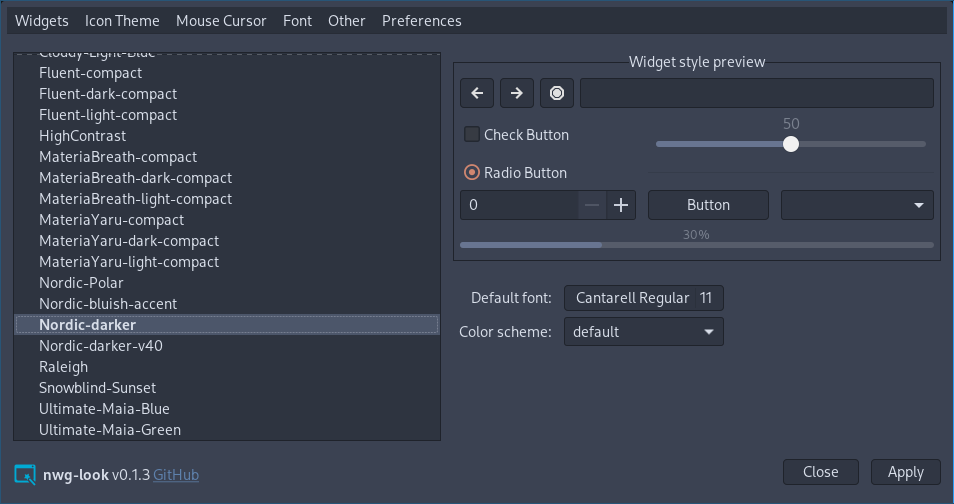
Nwg-look is a GTK settings editor, designed to work properly in wlroots-based Wayland environment. The look and feel is strongly influenced by LXAppearance, but nwg-look is intended to free the user from a few inconveniences:

  • It works natively on Wayland. You no longer need Xwayland, nor strange env variables for it to run.
  • It applies gsettings directly, with no need to use workarounds. You don't need to set gsettings in the sway config file. You don't need the import-gsettings script.

nwg-look

Dependencies

  • go (build dependency)
  • gtk3
  • xcur2png
  • gsettings
  • canberra-gtk-play

A GTK module, such as canberra-gtk-module, may need to be loaded for sounds to be played across applications.

Depending on your distro, you may also need to install gotk3 dependencies.

Installation

![Packaging status](https://repology.org/badge/vertical-allrepos/nwg-look.svg)

If nwg-look has not yet been packaged for your Linux distribution:

  1. Clone the repository, cd into it.
  2. make build
  3. sudo make install

Usage

$ nwg-look -h
Usage of nwg-look:
  -a	Apply stored gsetting and quit
  -d	turn on Debug messages
  -r	Restore default values and quit
  -v	display Version information
  -x	eXport config files and quit

The -a flag has been added just in case. When you press the "Apply" button, in addition to applying the changes, a backup file is also created. You may apply gsetting again w/o running the GUI, by just nwg-look -a. No idea if it's going to be useful in real life. ;)

Usage in sway

The default way to apply GTK setting on sway Wayland compositor has been described in the GTK 3 settings on Wayland Wiki section. You no longer need it. Nwg-look loads and saves gsettings values directly, and does not care about the ~/.config/gtk-3.0/settings.ini file. It only exports your settings to it, unless you use the -n flag.

Therefore, if your sway config file contains either

set $gnome-schema org.gnome.desktop.interface

exec_always {
    gsettings set $gnome-schema gtk-theme 'Your theme'
    gsettings set $gnome-schema icon-theme 'Your icon theme'
    gsettings set $gnome-schema cursor-theme 'Your cursor Theme'
    gsettings set $gnome-schema font-name 'Your font name'
}

or if you use the import-gsettings script:

exec_always import-gsettings

to parse and apply the settings.ini file, remove these lines.

Backward compatibility

Some gsetting keys have no direct counterparts in the Gtk.Settings type. While exporting the settings.ini file, nwg-look uses the most similar values:

gsettings Gtk.Settings
font-hinting gtk-xft-hintstyle
font-antialiasing gtk-xft-antialias
font-rgba-order gtk-xft-rgba

Some Other settings have been left just for LXAppearance compatibility, and possible use of your settings.ini file elsewhere:

  • Toolbar style
  • Toolbar icon size

have been deprecated since GTK 3.10, and the values are ignored.

  • Show button images
  • Show menu images

have been deprecated since GTK 3.10, and have no corresponding gsettings values.

GitHub Flavored Markdown (github-markdown-css)README snapshot at b9cc3e6b85